
www.rambler-info.org.uk - following stored tracks
The most useful thing a walker can do with a GPS is to use it to follow a stored track.
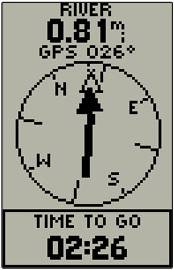
Follow the arrow to get to your destination.
The stored track in your GPS could have come from many different sources: it could be a commercial item, a freeware walk off the internet, a walk done by a friend, a walk you have constructed using a digital map, or a walk you have done yourself in the past and have recorded.
It will have been loaded from a computer to your GPS. Once there and called up to run, all you will have to do is to walk in the direction the arrow points and you will eventually complete the walk.
True, but the novice will find two major pitfalls when they try it. I have many friends who I have introduced to track-following and they all experienced the same initial problems. There is a third problem which is more serious, but is usually associated with woodland and sometimes by cliffs.
So, may I offer the following advice?

When using a compass, people usually stop to have a better look at their compass and surroundings. With a GPS you must not do this. If you do the arrow will point in various random and meaningless directions. It will continue to do so until you begin walking again. Any direction will do. The GPS can soon tell you that if it was the wrong direction and it will put you right in under 5 seconds.

This is perfectly normal for the arrow to waver and there is a good reason. Just keep going in the general direction indicated and all will be well. This is particularly easy to do if there is a footpath or track!
A GPS will not work if it is not getting signals from a sufficient number of satellites. If you are near any big cliffs, then these may block the signal. Less obviously, trees are a big problem. They rarely stop the signals completely, but they frequently result in "rogue" readings. Usually we are talking about rogue readings in the current position worked out by the GPS. However, if you have loaded a track gathered by a GPS rather than one produced on a digital map, there could be rogue points in the track. With the latter, it is useful if you have been able to view the track on a computer screen before starting the walk: rogue points are mostly single points lying off the obvious route and usually occur sandwiched between valid points.
All you can do in such a case is to keep your wits about you. If you suspect there are rogue points in the track then you are just going to have to ignore the GPS and continue forwards until such time as it gets a valid point or reading. Hopefully you have stayed of the correct route, but if not, the persistent nagging of the GPS should eventually warn you that you had gone wrong.


