
You can click on some images to see a 600-pixel version in a new window.
I do not have access to a copy of their 1:25000 scale mapping. I do have a copy of their excellent 1:50000 scale National Parks map, which has got to be the most cost effective purchase of all the mapping programs.
Gartrip is very different from the other three programs in this survey. It is sold on the Internet on what looks like a part-time basis. The program contains no maps, but plots tracks on a plain background by default. Alternatively it will plot the tracks on a map that you provide.
If you happen to have a digital map and you can accurately reference two points on the map, then Gartrip can "calibrate" the map to use as a background to the plotted tracks. If you don't have a digital map then you can scan one of your paper maps and use that.
It is a product based on selling Ordnance Survey 1:25000 digital maps. Tracks and waypoints can be added either from a GPS or by keyboard/mouse input.
3D-rendered views of the maps are possible
It is a product based on selling Ordnance Survey 1:25000 digital maps. Tracks and waypoints can be added either from a GPS or by keyboard/mouse input.
3D-rendered views of the maps are possible
Use the GPS Exchange file format (extension .gpx). (See below.) This is a Public Domain format and most, but not all, of the commercial digital mapping programs can read and write the files. [If your mapping program does not do so then be cautious in spending any more money with them: they will probably be going out of business soon!]
There is a lot of flexibility for individual preferences. My own preference is for printing walks at 1:25000 scale on A4 paper and laminating the resulting map to make it waterproof.
If the chosen track is printed so that it shows up clearly then some fine details will be hidden by the line. There is a very easy antidote to this. You should print a copy of your map on each side of the paper before laminating and leave out the track on one of the copies.
For one area of the country I own both the Memory Map and the Tracklogs maps. My copy of Tracklogs has the more up-to-date maps. I usually edit my tracks in Tracklogs then print them using Memory Map, even though the resulting maps are less up-to-date!
That really puts the relative merits in perspective!
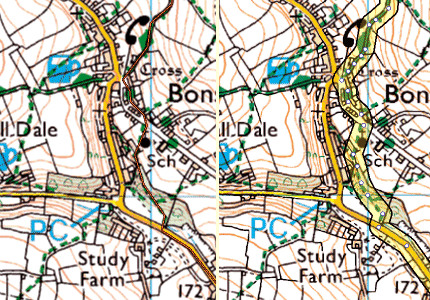
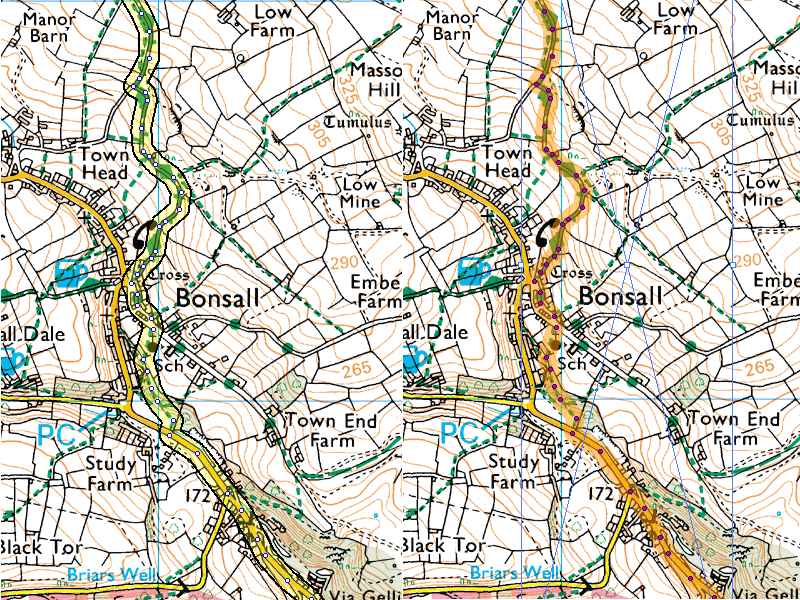
The same track is plotted using each of the programs. The Memory Map rendering is on the left and Tracklogs rendering on the right.
Update....Tracklogs now has user-configurable styles for marking the track and you can set your own default style.
It is possible to own a GPS which will display a moving map with your current position marked on the map. This is the shape of the future!
I now own a Satmap moving-map with a 50k OS map. I do not use it for navigation, but it is quite nice to have 50k maps of the whole of GB and Northern Ireland. I do also have a 25k OS map of the area around where I live and that does get a little use. If you are thinking of buying one then you should be aware that filed boundaries are mssing on the 50k OS maps and present on the 25k OS maps. If you are a walker then just ask yourself what is the major feature that you use all the time to navigate on your walks!
I feel the whole thing is not very cost-effective. One of my few mindless extravagances!
There has been a problem in that each of the commercial programs used a proprietary file structure which makes it impossible to read the files of another program. As time has gone by the companies have relented and added routines that let other company's files be read and maybe written. Often they have excluded the files of the program seen as their main competitor.
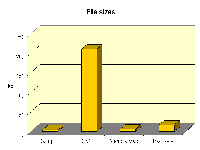 There are several public domain file formats, but one has definitely taken the lead. This is the GPS Exchange Format (GPX). It has very few limitations in what information it can store and so most of the commercial companies have now incorporated routines to read and write in this format. For the GPS user, these files are probably the best format to use for storing your data. You just need to beware that the routines provided may discard some information. So it is best to also store a copy of the data in the native file format of the program handling it. This means double-handling of the data and also the GPX format is very bulky (see bar chart on the right) Luckily are now in an era where data storage is cheap and plentiful; at least it is on the home computer where the data will usually be stored.
 There is not much difference between the commercial file storage formats. There are differences (see bar chart on right). However they are all commendably compact and all much more compact than GPX files.

